Transfer domain into different account
|
Firstly , mouse over Manage Domain under Action column associate with the domain name and click on the "Transfer Account" option.
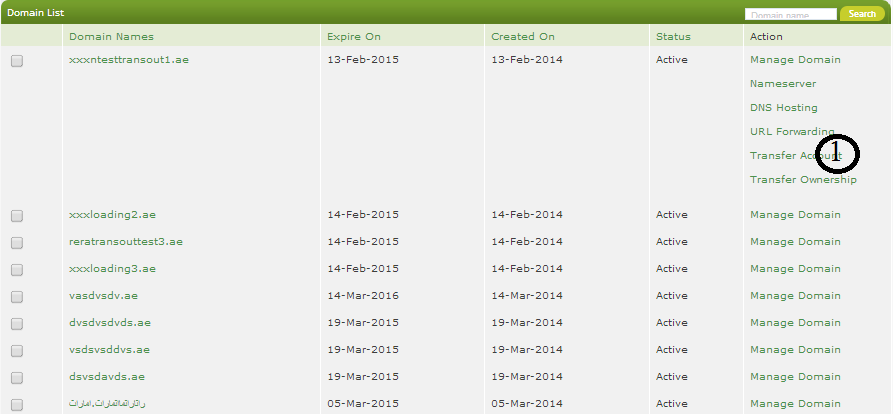
If you want to transfer domain into a new account.
Step 1:
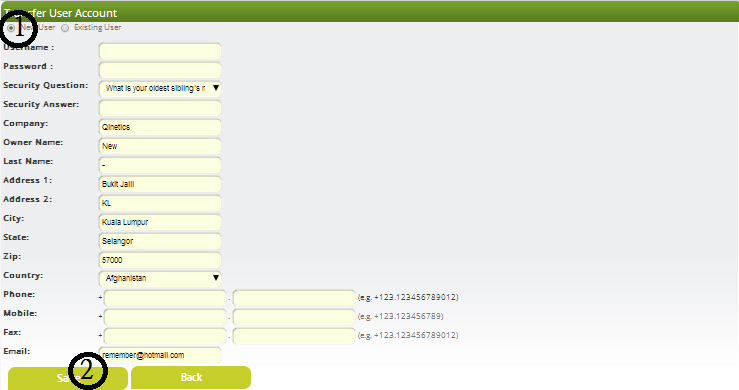
Click on the 'New User' radio button and provide all the information (user ID, password, security question, security answer, company name, first name, last name,address 1, address 2, city, state, zip, country, phone, fax and email).
Step 2:
Click 'save' to save your changes permanently.
If you want to transfer domain into existing account.
Step 1:
Click on the 'Existing User' radio button.
Step 2:
Enter existing user's User ID and password.
Step 3:
Click save to save your changes permanently.

Back to FAQ
|